
Age Calculator
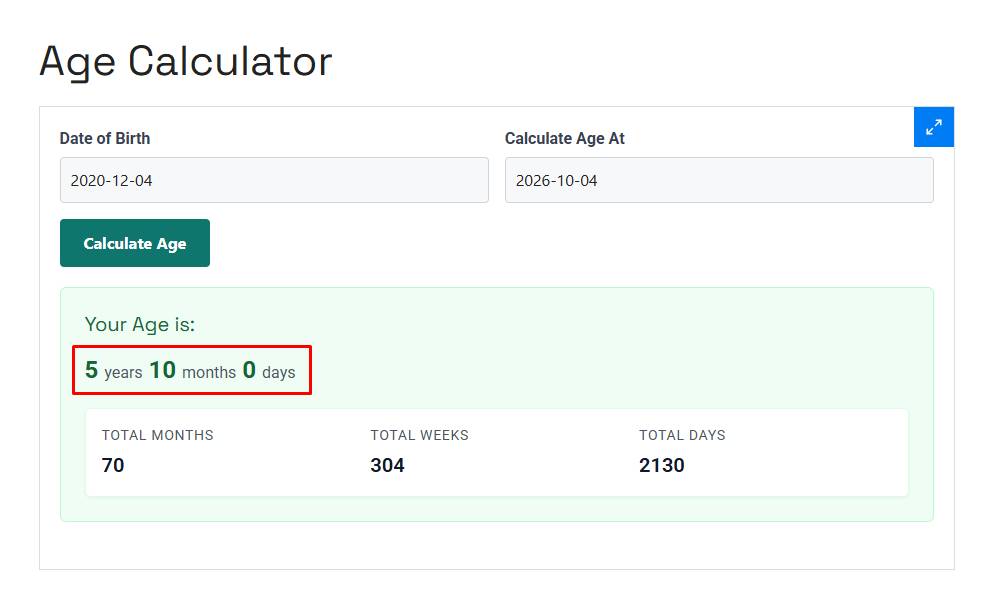
Your Age is:

Age Calculator: Calculate Your Exact Age in Years, Months & Days
Knowing someone’s age sounds simple until you need the exact answer.
If you only need a person’s age in whole years, subtracting the birth year from the current year may be enough. But that approach can give the wrong answer when the person’s birthday hasn’t happened yet. It also doesn’t tell you the number of months and days that have passed since the last birthday.
The Kodenic Age Calculator lets you calculate age using two dates: a Date of Birth and a Calculate Age At date. The result area provides the age along with totals for months, weeks, and days.
Open the Kodenic Age Calculator
This makes it useful not only for finding out how old someone is today, but also for checking how old they were or would be on a particular date.
What Is an Age Calculator?
An age calculator determines the amount of time between a person’s date of birth and another date.
The most familiar way to express that result is in years, months, and days. For example:
26 years, 6 months, and 19 days
That is different from simply saying someone is 26 years old. The first version gives a more detailed calendar-based breakdown, while the second gives the completed age in years.
The Kodenic tool asks for a date of birth and a date in the Calculate Age At field. Both fields use the YYYY-MM-DD date format.
What Does the Kodenic Age Calculator Calculate?
The tool has two date inputs:
- Date of Birth — the starting date for the calculation.
- Calculate Age At — the date on which you want to determine the person’s age.
After you select the dates and choose Calculate Age, the page provides an age result and displays totals for:
- Total months
- Total weeks
- Total days
These are the outputs visibly provided by the Kodenic calculator.
The second date is particularly useful because an age calculation doesn’t always have to be based on the current date. You can use a particular date when you need to answer a question such as, “How old was this person on that day?”
How to Use the Kodenic Online Age Calculator
Using the calculator only requires a couple of dates.
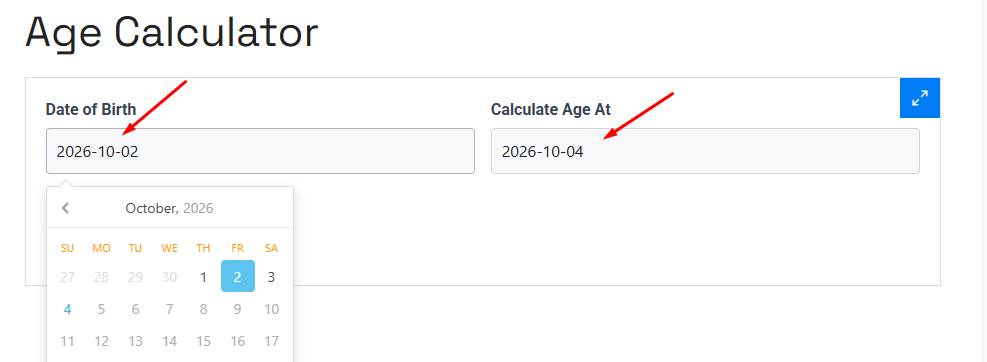
1. Enter the date of birth
Enter the person’s birth date in the Date of Birth field.
Use the date format shown by the calculator:
YYYY-MM-DD
For example:
2000-03-15
2. Enter the date to calculate the age at
Enter the date you want to use as the reference point in Calculate Age At.
For example:
2026-10-04
This lets you calculate age at a particular point rather than relying on an unspecified date.
3. Select Calculate Age
Click Calculate Age to perform the calculation.
4. Read the result
The calculator displays the age and the available totals, including total months, total weeks, and total days.
That’s all you need to do.
How Is Age Calculated?
Age isn’t simply the difference between two years.
Suppose someone was born on March 15, 2000, and their age is being calculated on October 4, 2026.
Their completed age is:
26 years, 6 months, 19 days
Why?
- March 15, 2000 → March 15, 2026 = 26 complete years
- March 15, 2026 → September 15, 2026 = 6 complete months
- September 15, 2026 → October 4, 2026 = 19 days
So the calendar-based age is 26 years, 6 months, and 19 days.
This is why an exact age calculation is more involved than simply doing:
2026 - 2000 = 26
The subtraction gives the right whole-year age in this particular example, but it doesn’t provide the months and days.
Why Your Birthday Matters
Consider someone born on March 15, 1990.
On March 14, 2026, that person has not reached their 36th birthday yet. Their completed age is therefore still 35.
On March 15, 2026, they turn 36.
That one-day difference matters whenever you need an age at a specific date.
This is one reason an age calculator can be more useful than simply subtracting one year from another.
Age in Years, Months, and Days vs. Total Days
The Kodenic calculator presents the result in several units, including years, months, weeks, and days.
These measurements answer slightly different questions.
Years, months, and days
This is the most natural way to describe someone’s calendar age.
For example:
26 years, 6 months, 19 days
It is easy for a person to understand because it follows the way birthdays and calendar anniversaries are normally described.
Total months
Total months expresses the elapsed age using months rather than years and months.
This can be useful when the number of months is more meaningful than a whole-year figure, particularly when discussing relatively young children or tracking time over shorter periods.
However, months aren’t all the same length. A calendar month can contain 28, 29, 30, or 31 days, so a month shouldn’t automatically be treated as exactly 30 days.
Total weeks
Total weeks gives another way to express the elapsed period.
There are seven days in a week, so a total-day count can be related to weeks by dividing the number of elapsed days by seven. The exact presentation of the Kodenic result should be read directly from the calculator.
Total days
Total days answers a different kind of question: how many calendar days are represented by the date range?
This is why total days shouldn’t be confused with multiplying a person’s age by 365. Some years contain 366 days because of leap years.
Why You Shouldn’t Always Calculate Age as Current Year Minus Birth Year
A common shortcut is:
Current year − birth year = age
That only works for the completed-year portion when the birthday has already occurred in the reference year.
For example, suppose someone was born on November 20, 1995.
If the reference date is October 4, 2026:
2026 − 1995 = 31
But the person’s 31st birthday hasn’t arrived yet. Their completed age is still 30.
Once the reference date reaches November 20, the completed age becomes 31.
An exact calculator avoids this particular mistake by comparing the complete dates rather than looking only at the years.
Why Month Lengths Make Exact Age Calculation Tricky
A year is usually thought of as 365 days, but calendar years can also contain 366 days.
Months are even less uniform:
- January has 31 days.
- February has 28 days in a common year.
- February has 29 days in a leap year.
- April, June, September, and November have 30 days.
- Several other months have 31 days.
So treating every month as 30 days isn’t a reliable way to calculate calendar age.
For example, a calculation that simply converts everything into fixed 30-day blocks can produce a different result from a calendar-based calculation around the end of a month.
This is one of the reasons exact age calculators are useful: you don’t have to manually keep track of different month lengths.
What About Leap Years?
Leap years introduce another small complication.
A leap year contains 366 days rather than 365 because it includes February 29. The standard Gregorian calendar rule is that years divisible by four are leap years, except century years that aren’t divisible by 400.
For example:
- 2024 was a leap year.
- 2000 was a leap year.
- 1900 was not a leap year.
- 2100 will not be a leap year.
This matters when calculating total days between two dates.
It can also matter for someone born on February 29. Their birth date exists only in leap years, so the way a February 29 birthday is treated in a non-leap year can depend on the purpose of the calculation and the applicable local or legal convention.
For an ordinary age calculation, don’t assume that every February 29 situation has the same legal interpretation everywhere. If the result is being used for an official eligibility decision, check the rule that applies to that particular situation.
When Is an Age Calculator Useful?
An age calculator can be useful whenever knowing the precise age matters more than simply knowing a person’s birth year.
Checking someone’s current age
This is the most obvious use.
Enter the birth date and the relevant calculation date to determine the person’s age.
Finding age on a specific date
The Calculate Age At field is useful when the question isn’t “How old is this person today?” but rather:
“How old was this person on that date?”
For example, you might need to determine someone’s age on:
- A particular anniversary
- A historical date
- An application deadline
- An event date
- A future milestone
The Kodenic calculator specifically provides a field for choosing the date at which age should be calculated.
Checking an age before or after a birthday
If a person’s birthday is close to the reference date, calculating the complete dates can prevent the common mistake of assuming the new age has already been reached.
Looking at age in different time units
Sometimes years aren’t the unit you’re interested in.
The Kodenic results include total months, weeks, and days, which gives you alternative ways to view the same date span.
A Worked Age Calculation Example
Let’s take:
Date of birth: March 15, 2000
Calculate age at: October 4, 2026
Start by counting complete years:
March 15, 2000 → March 15, 2026
= 26 years
Then count complete months:
March 15 → September 15
= 6 months
Finally:
September 15 → October 4
= 19 days
So the calendar age is:
26 years, 6 months, 19 days
The elapsed period is also 9,699 days, showing why a total-day calculation and a years-months-days calculation are two different ways of expressing the same date range.
Another Example: When the Birthday Hasn’t Happened Yet
Now consider:
Date of birth: November 20, 1995
Calculate age at: October 4, 2026
The simple year subtraction gives:
2026 - 1995 = 31
But November 20 has not arrived yet.
The actual calendar age is:
30 years, 10 months, 14 days
This is a good example of why exact age depends on the day and month, not just the two years.
Common Mistakes When Calculating Age
Looking only at the birth year
This is probably the most common mistake.
A person doesn’t become a year older simply because the calendar enters a new year. Their completed age changes on their birthday, subject to the convention relevant to their situation.
Treating every year as 365 days
That ignores leap years.
Over a long period, even a one-day difference can matter when you’re calculating total elapsed days.
Treating every month as 30 days
Calendar months have different lengths, so fixed 30-day arithmetic isn’t the same as calendar arithmetic.
Using the wrong reference date
If you’re checking age for a deadline or eligibility date, using today’s date when the relevant date is actually in the past or future can produce the wrong answer.
That’s exactly where the Calculate Age At field becomes useful.
Entering the wrong date
An age calculation is only as good as the dates supplied to it. Double-check the day, month, and year before relying on the result.
Is Calendar Age the Same as Decimal Age?
No.
A calendar age might be written as:
26 years, 6 months, 19 days
A decimal-age calculation might instead express the same approximate period as something like:
26.55 years
Those are different representations.
Decimal age is useful in situations where mathematical calculations require a single numerical value. Calendar age is generally easier for people to understand because it preserves the years, months, and days.
You shouldn’t automatically substitute one for the other. If a form, policy, institution, or professional asks for a particular age format, use the format it specifies.
Can You Calculate Age on a Past or Future Date?
Yes, when the calculator’s Calculate Age At field is set to the date you want to examine.
For example, instead of asking:
“How old is this person now?”
you can ask:
“How old was this person on January 1, 2020?”
or:
“How old will this person be on January 1, 2030?”
The important part is that the reference date must be selected correctly.
The Kodenic calculator explicitly provides this second date field, rather than limiting the calculation to a single current-date result.
What the Kodenic Age Calculator Does Not Tell You
The visible Kodenic calculator page confirms the date inputs and the displayed age/month/week/day outputs, but it does not document additional features such as birthday countdowns, time-of-birth calculations, export tools, PDF generation, account functionality, or data-storage policies.
Those features are common on some other age calculators, but they shouldn’t automatically be attributed to Kodenic.
That distinction matters when you’re choosing a tool: use the features that are actually presented by the calculator rather than assuming that every age calculator works the same way.
Frequently Asked Questions
How do I calculate my exact age?
Enter your date of birth and the date at which you want to calculate your age. The Kodenic Age Calculator provides the resulting age and displays total months, weeks, and days.
What information do I need for the Kodenic Age Calculator?
You need a Date of Birth and a Calculate Age At date. The page shows both fields in YYYY-MM-DD format.
Can I calculate age on a specific date?
Yes. That’s one of the purposes of the Calculate Age At field. Instead of limiting the calculation to the current date, you can specify the date you want to use as the reference point.
Why isn’t current year minus birth year always the correct age?
Because the birthday may not have occurred yet in the reference year. Someone born in November 1995 is still 30 on October 4, 2026, even though 2026 - 1995 equals 31.
Why do months matter when calculating exact age?
Months have different numbers of days. February, for example, is shorter than January, while some months have 30 days and others have 31. A calendar-based age therefore can’t be calculated reliably by treating every month as the same length.
Do leap years affect age calculations?
They can affect the number of elapsed days between two dates because leap years contain February 29. They are particularly relevant when calculating long date ranges or total days.
What is the difference between age in years and total days?
Age in years describes completed calendar years. Total days describes the number of elapsed calendar days between the two dates. Because years can contain different numbers of days, the two measurements shouldn’t be converted using a simple fixed 365-day assumption.
What is a reference date in an age calculation?
The reference date is the date on which you want to know someone’s age. In the Kodenic calculator, this is represented by the Calculate Age At field.
Can an age calculator be used for an official decision?
A calculator can help you determine a date-based age, but an official organization may have its own rules about how age is defined for a particular application, benefit, legal requirement, or eligibility test. When the result affects an official decision, verify the applicable requirement with the relevant authority.
What should I do if I get an unexpected age?
First check both dates carefully. Make sure the date of birth and reference date are correct and that you haven’t accidentally used the wrong day, month, or year. Pay particular attention when the reference date is close to the person’s birthday.
Calculate Your Age
If you need more than a rough year difference, use the Kodenic Age Calculator with the person’s date of birth and the date you want to calculate against.
It can give you a clearer calendar-based age while also showing the result in total months, weeks, and days.